
Homepage Copy Audit: A 7-Step Method for Service Firms
Run a homepage copy audit on your own site: seven checks for clarity, proof, price signals and calls to action, built for Singapore service businesses.

Written by Thiam Hock NgFounder
15 min read
A homepage copy audit is a structured read of your homepage words, from the headline to the button, to find where a serious buyer hesitates and leaves. You can run one yourself in an afternoon. This guide gives you the seven checks I use, a scoring method, and the mistakes that make most self-audits useless.
It is written for owners and marketing leads of service businesses that already get traffic but not enough good enquiries. If you sell services above SGD 2,000, the homepage is rarely judged on design. It is judged on whether a stranger can decide, within seconds, that you are the right and safe choice.
TL;DR
- A copy audit asks one question per section: does this help a right-fit buyer decide, or does it just describe us?
- Check seven things in order: the first-screen promise, who it is for, differentiation, proof, price signals, calls to action, and the path after the click.
- Audit with real visitor language (sales calls, emails, reviews), not your own opinions.
- Fix messaging before you touch design. A rewrite of words and order is cheaper and safer than a redesign.
- Score each check 0 to 2, fix the lowest scores first, and change one block at a time so you can see what moved.
Table of Contents
- What a homepage copy audit is, and what it is not
- Before you start: gather the right inputs
- The 7-step homepage copy audit
- Scoring your audit and deciding what to fix first
- What the numbers can and cannot tell you
- Using AI tools in an audit
- Five mistakes that ruin a self-audit
- Our perspective: audit the decision, not the prose
- When to get a second pair of eyes
- FAQ
- Sources
What a homepage copy audit is, and what it is not
A website audit usually covers speed, broken links, SEO tags and mobile layout. A copy audit covers meaning. It asks whether the words on the page make the right person feel understood, make your offer clear, and make the next step feel low-risk.
That difference matters because a technically perfect homepage can still leak enquiries. I see this often: fast load, clean layout, and a headline that says something like “Excellent solutions for your business needs.” Nobody can disagree with it, and nobody can act on it.
A copy audit is also not a rewrite. The audit tells you what is broken and why. The rewrite comes after, and it goes much better when the audit has told you what the page must achieve.
Why the homepage gets audited first
For a service business, the homepage is the page that has to answer the visitor’s core question. Usability researchers at Nielsen Norman Group describe the first guideline for homepages as stating what your site offers that is of value and how your services differ from those of key competitors, and they list it among the most frequently violated. If that is the rule most sites break, it is the best place to start looking.
Before you start: gather the right inputs
Most self-audits fail because the owner reads the page as the owner. You know your services too well. You cannot unsee what you meant.
Gather these before you read a single line:
- Your last 10 to 20 enquiries, including the ones that were a poor fit. Note what they asked for and what words they used.
- Sales call notes or recordings, if you have them. The phrases buyers use to describe their problem are better than anything you will invent.
- Reviews and testimonials, including how clients describe the result in their own words.
- Your analytics for the homepage: traffic source, bounce or exit rate, and how many visitors reach your contact page. Scroll maps help too. As Equinet Academy notes, if most visitors leave before scrolling past the hero section, the headline or above-the-fold content is the first suspect.
- One honest outsider: someone who does not know your industry, to read the page for five seconds and tell you what you do.
That last one is the cheapest test in this article, and the one owners skip.
The 7-step homepage copy audit
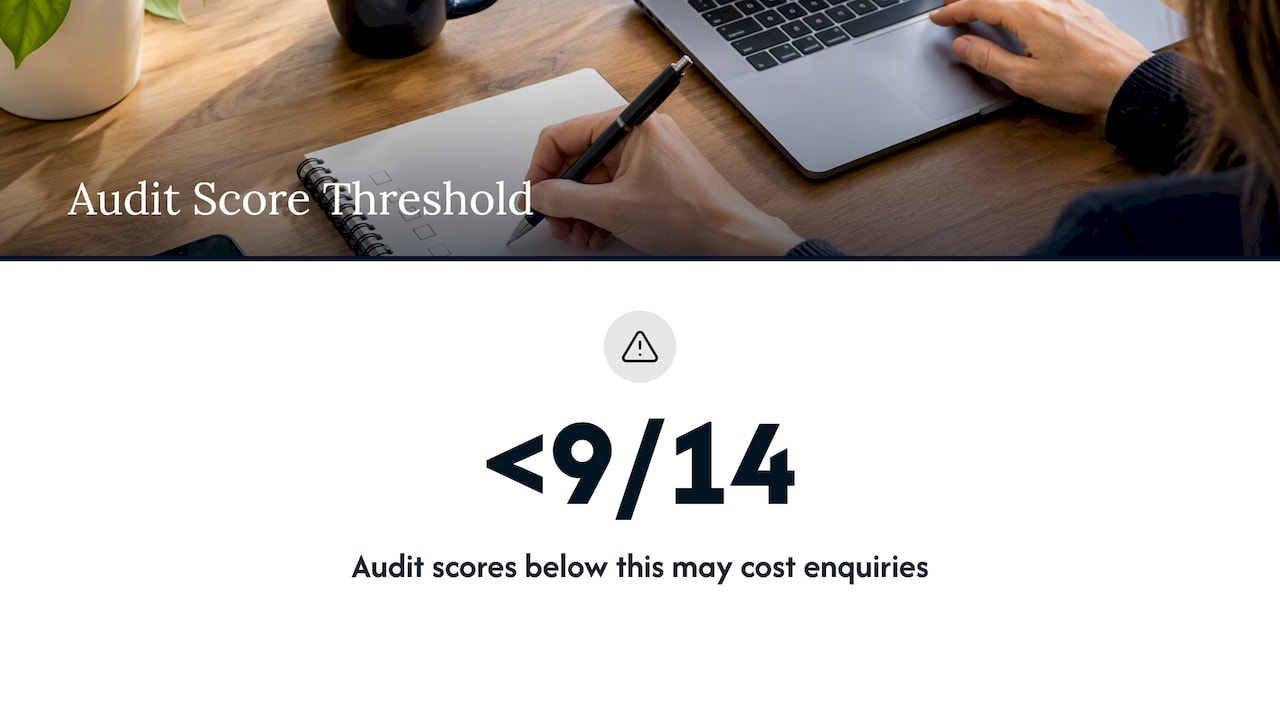
Work through the page top to bottom. Score each step 0 (missing or unclear), 1 (present but generic) or 2 (specific and credible). A total below 9 out of 14 means the homepage is probably costing you enquiries.
Step 1: The first-screen promise
Cover everything below the first screen. Then ask your outsider three questions:
- What does this company do?
- Who is it for?
- What would I do next?
If they hesitate on any of them, you have your first fix. Nielsen Norman Group’s long-standing advice is to start with a one-sentence tagline that summarizes what the company does. It should not be a slogan. It should be a plain statement.
Compare:
- Weak: “Empowering businesses to reach their full potential.”
- Stronger: “Tax and accounting for owner-run Singapore companies turning over SGD 1M to SGD 10M.”
The second line filters. It tells the wrong buyer to leave and the right buyer to stay. That is a feature, not a loss, when you are trying to attract fewer price-shoppers.
Step 2: Who it is for, and what problem they have
Read your hero and first section and count the sentences about you versus the sentences about the buyer. Most service homepages open with the firm: our team, our experience, our approach.
Visitors are not looking for a list of features. They want a solution to a specific problem. Nielsen Norman Group’s research summary calls this out as the trap of listing features instead of value, which is why the audit should flag every line that describes a capability without naming the situation it solves.
A quick test: replace “we” with “you” in a paragraph. If the sentence stops making sense, it was about you. For a deeper walkthrough of this shift, see our piece on customer-centric copy for service businesses.
Step 3: Differentiation you could not copy and paste
Highlight every claim on the page that a competitor could also put on their site without lying. “Quality service.” “Tailored solutions.” “Trusted partner.” “Years of experience.”
If most of the page is highlighted, the page has no positioning. Buyers then fall back on the one thing they can compare: price. This is the usual root of price-shopping enquiries.
Replace each interchangeable claim with something checkable:
- A specific type of client you serve, and one you do not.
- A method with a name and steps.
- A result with a number and a context.
- A constraint you accept on purpose, such as a limited number of engagements at a time.
If you cannot write one of these, the audit has found a positioning problem, not a copy problem. Better wording will not fix it. A workshop or a candid conversation with your best clients will.
Step 4: Proof, and where it sits
Proof placed on a separate testimonials page does very little. Proof placed next to the claim it supports does a lot.
For each major claim, check whether evidence sits within one scroll of it. Evidence can be a client name and result, a case summary, a certification, a recognizable client logo (with permission), or a named expert. For professional services, people matter. Equinet Academy’s guidance for Singapore service businesses says featuring individual specialist profiles with photos, qualifications and specific experience drives higher enquiry rates, because clients prioritize the professional relationship over firm branding. Treat that as a hypothesis to test on your own page, not a guarantee.
Audit questions for proof:
- Are testimonials attributed with a name, role and company, or anonymous?
- Do they describe an outcome, or only say “great to work with”?
- Can a visitor see who they would actually be speaking to?
Step 5: Price signals
This is the step owners resist. You do not have to publish a price list. But a homepage that says nothing about cost, scale or fit invites the buyer to assume the worst.
The same Equinet guidance claims that sites without even a price range on service pages lose around 60% of prospective clients to fear of hidden costs. I would not quote that figure as a law of nature, since it is a general industry claim and your market may differ. The direction is sensible, though. Buyers of high-ticket services want to know whether they are in the right range before they spend time on a call.
You have options short of a full price list:
- A “projects typically start from” line.
- A description of what drives the cost up or down.
- Engagement tiers without exact figures.
- A statement of who you are not the right fit for.
We wrote a short checklist on this: 4 questions to ask before publishing website pricing. Use it before you decide.
Step 6: Calls to action
Look at every button and link that asks for something. Count them. Read each one aloud.
Common failures:
- “Submit” or “Contact us” as the only option. It tells the visitor nothing about what happens next.
- Too many competing asks. Call, WhatsApp, download, subscribe, book, all at the same weight.
- A single high-commitment ask. Not every visitor is ready to book a call. Offer a lower-risk step as well, such as a review or a short checklist.
- Buttons that do not match the promise of the section above them.
A good button says what the visitor gets: “Get a review of my homepage” beats “Submit.” Our notes on replacing “Submit” with clearer service buttons and on service CTA examples and sizing go into wording and tap-target detail.
Step 7: The path after the click
Copy does not end at the button. Read the form page or booking page as if you were the buyer.
- Does it say what happens after submission and how fast you reply?
- Does it ask only for what you need?
- Does the language match the button that brought them there?
Baymard Institute’s concept of return on click investment puts it neatly: set the right expectation before the click, then live up to it on the next page. If the pay-off is lower than the effort the click demanded, people leave. Check that your homepage promises and your next page deliveries match.
Scoring your audit and deciding what to fix first
Put your scores in a simple table.
| Check | Score (0-2) | Evidence you saw | Fix |
|---|---|---|---|
| First-screen promise | Outsider’s 5-second answer | ||
| Who it is for | Count of “you” vs “we” lines | ||
| Differentiation | Number of copy-and-paste claims | ||
| Proof | Distance between claim and evidence | ||
| Price signals | Any range, tier or fit statement | ||
| Calls to action | Number and wording of asks | ||
| After the click | What the form page promises |
Fix in this order: first-screen promise, who it is for, differentiation, then the rest. Upstream problems make downstream fixes pointless. Beautiful proof under a vague headline still gets ignored.
Change one block at a time where you can. If you rewrite the whole page and enquiries rise or fall, you will not know why.
What the numbers can and cannot tell you
Conversion rate is useful, but be careful about benchmarks. Service-business visitors are evaluating a relationship, not a product price, so the first judgment of trust is the main hurdle on the homepage. A rate copied from an e-commerce article tells you very little. We cover this in why a generic B2B conversion benchmark is not your target.
Two practical habits help:
- Track qualified enquiries, not just form fills. A rise in volume with a drop in fit means your copy is attracting the wrong people.
- Compare against your own baseline over at least a month, with the same traffic sources.
If you run paid ads, the cost of weak copy is direct. Industry guidance suggests an extra point of conversion can scale revenue meaningfully, which is why improving the existing homepage is often more cost-effective than buying more traffic. Your own cost-per-lead figures from your ad account are the best numbers to use here.
Using AI tools in an audit
AI writing tools can help with the mechanical parts: summarizing your page in one sentence to see whether it matches your intent, generating alternative headlines to react to, or flagging vague phrases. An AI website copy generator can give you raw drafts quickly.
Be careful about what you ask it to decide. A tool cannot know which of your clients paid well, who was a poor fit, or what your best buyer said on the call. It will produce fluent, generic copy unless you feed it your real language and positioning. Use it to draft options, then judge them against the seven checks above.
Five mistakes that ruin a self-audit
- Auditing for taste. “I don’t like this headline” is not a finding. “Three out of five readers could not say who this is for” is.
- Judging only desktop. Many first visits happen on a phone, where the hero and button may be all that gets seen. See our guide on fixing a service homepage for mobile.
- Mistaking more content for more clarity. Adding sections rarely helps. Cutting lines that do no work often does.
- Fixing symptoms. A weak button is often a symptom of an unclear offer.
- Starting a redesign. If the words and order are wrong, a new design only makes wrong messaging look better.
Our perspective: audit the decision, not the prose
We approach a homepage as a decision system. A visitor arrives with a question, scans for evidence, weighs risk, and either takes a step or leaves. Good copy lowers the risk at each point where someone might stop. A page can be well written and still fail, because grammar and style are not what stalls a decision.
That is why our work starts with friction, not with rewriting. We look at where a right-fit buyer would hesitate, whether that is an unclear offer, missing proof, or a hidden cost. Then we build a blueprint: the key messages, where the proof goes, and how the calls to action are ordered. The aim is more right-fit enquiries and fewer price-shoppers, without a risky redesign.
Our honest view is that most service firms do not need a new website. They need a clearer one. If you do the seven steps above carefully, you will already have found most of what we would find.
— Fadly
When to get a second pair of eyes
A self-audit works well for the first pass. It struggles when:
- You cannot tell whether the problem is positioning or wording.
- You are too close to the business to see which claims are generic.
- You have the traffic but cannot explain why the enquiries are poor.
If that sounds familiar, our Free Website Review is a low-risk place to start. When you want a full plan, the Homepage Restructure service turns the findings into a blueprint with a video walkthrough, so your team can implement it with confidence. The homepage blueprint is SGD 480 one-off, Homepage + About is SGD 680 one-off, and a full-site blueprint is SGD 2,000 one-off. You can see the details on the pricing page.
FAQ
How long does a homepage copy audit take?
A focused self-audit takes two to four hours once you have your inputs ready. Most of the time goes into reading enquiries and call notes, not the page itself. The five-second outsider test takes about ten minutes.
How often should I audit my homepage copy?
Do it when your offer, audience or pricing changes, and at least once a year otherwise. Also audit after a drop in enquiry quality, even if traffic is steady. Changing one block at a time makes each review easier to measure.
What is the difference between a copy audit and a copy critique?
The terms overlap. A critique usually gives opinions and line edits on the writing. An audit goes further: it checks the copy against the buyer’s decision, including positioning, proof, price signals and calls to action, and ranks what to fix.
Should I rewrite my homepage myself after the audit?
You can if the findings are mostly wording and order. If the audit shows unclear positioning, settle that first, because rewriting words cannot fix an offer buyers cannot tell apart from your competitors. Test one change at a time and compare qualified enquiries, not just volume.
Sources
- The Ten Most Violated Homepage Design Guidelines, NN/G
- Top 10 Guidelines for Homepage Usability, NN/G
- 10 Proven Techniques on How to Improve Your Business Conversion Rate, Equinet Academy
- ROCI: Return On Click Investment, Baymard Institute