Marketers: Fix High Bounce Rate with GA4's 10 Second Engagement Rule
Marketer's playbook to fix high bounce rate with GA4's 10 second engaged session rule. Diagnose four root causes, prioritize fixes, and test a homepage...
A high bounce rate is a diagnostic signal, not automatic proof your site is failing. Its meaning depends entirely on what the page was supposed to do and where the visitor came from. If the page exists to move someone toward a decision, a high bounce rate deserves investigation using GA4’s engagement data, behavioral tools like heatmaps, and a prioritized set of fixes, which is exactly what this guide walks through.
TL;DR:
- The actual calculation of bounce rate in GA4 relies on engagement definitions, making it more meaningful for understanding visitor interest than the traditional bounce measure.
- Improving site speed by compressing images and removing render-blocking scripts is the most effective way to reduce a legitimately high bounce rate quickly.
- High bounce rates on pages like FAQ or store hours are not problematic if metrics like scroll depth and time on page show visitors are satisfied.
- Segmenting data by landing page, traffic source, and device type helps pinpoint whether a high bounce rate reflects technical issues, mismatch messaging, or genuine visitor disinterest.
- Focusing on conversion and goal completion metrics, rather than bounce rate alone, reveals the true business impact of page performance improvements.
Table of Contents
- What bounce rate actually measures in GA4
- How to calculate bounce rate and where exit rate fits
- What counts as a good, average, or high bounce rate
- When a high bounce rate is actually a good sign
- What actually causes a high bounce rate
- How to diagnose what’s really driving your bounces
- How to reduce a high bounce rate that’s actually a problem
- Where to focus first: an impact times effort framework
- What to measure after you make changes
- How a homepage blueprint targets the friction behind bounces
- A metric is a tool, not a verdict
- A practical next step if your homepage is bouncing visitors away
- Sources
- FAQ
What bounce rate actually measures in GA4
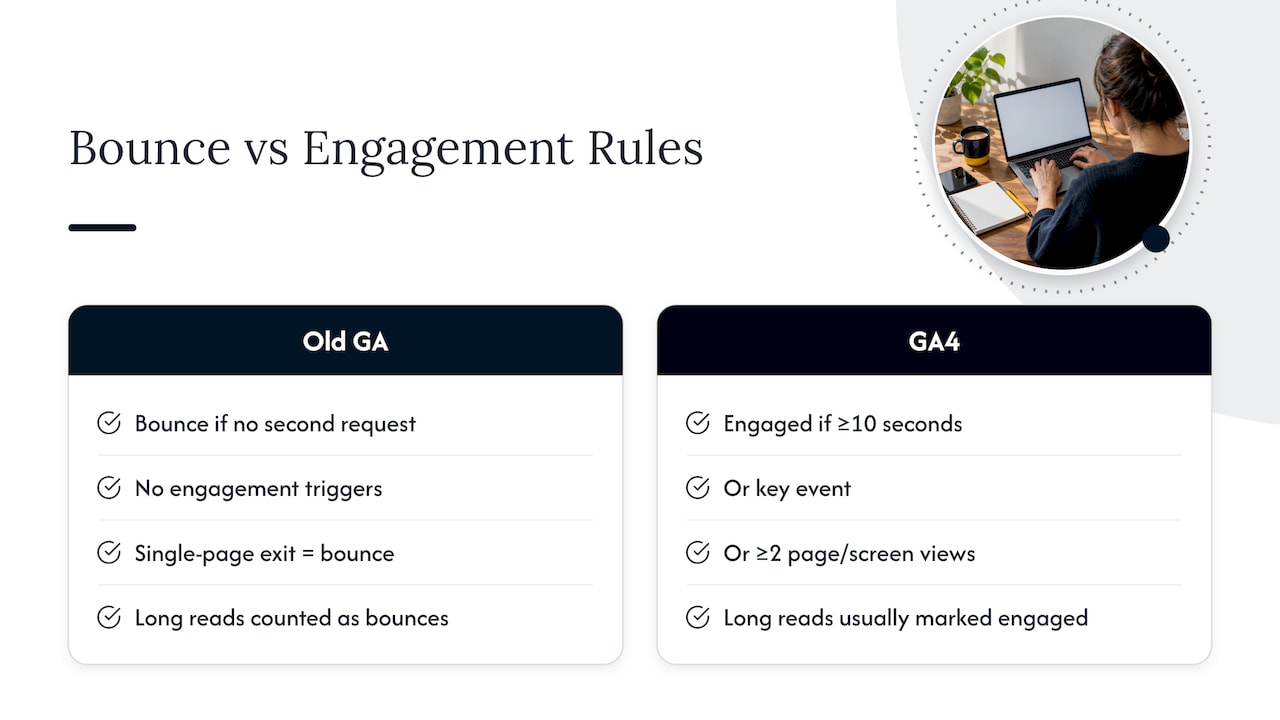
Bounce rate used to mean one thing: a visitor landed on a page and left without triggering a second request. Google Analytics 4 flipped the framing. Instead of counting bounces directly, GA4 defines an engaged session as one that lasts at least 10 seconds, includes a key event, or includes at least two page or screen views. Bounce rate is simply the inverse of engagement rate. If a majority of sessions are engaged, your bounce rate is correspondingly lower.
This matters more than it sounds like it should. Under the old model, someone who read a 2,000 word article for four minutes and then closed the tab counted as a bounce, because they never triggered a second pageview. Under GA4’s model, that same visitor is engaged, because they cleared the 10 second threshold. The practical effect is fewer false positives for long single-page reads, and a bounce number that more closely tracks actual disinterest rather than simple page structure. It also means you can shape the number yourself: adding a key event for scroll depth or a CTA click can turn a technically-satisfied visit from a bounce into an engagement.
How to calculate bounce rate and where exit rate fits
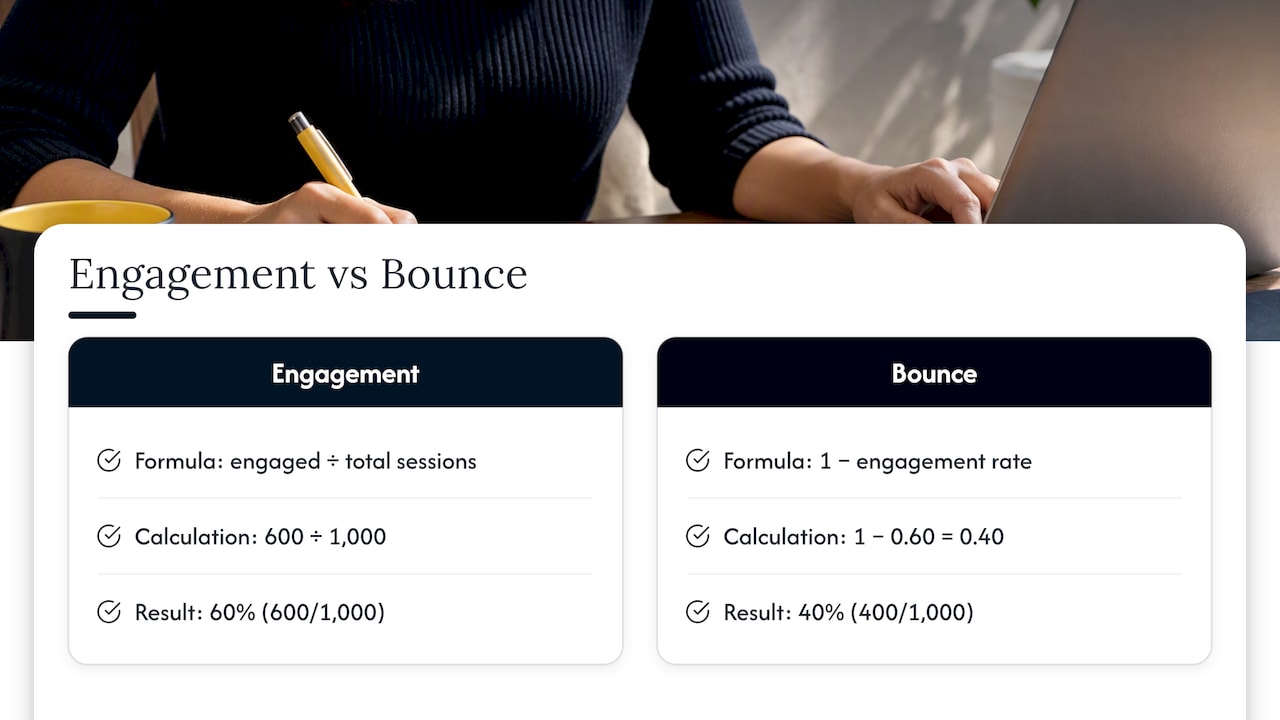
The classic formula is straightforward: bounce rate equals single-page sessions divided by total sessions. GA4 reports it as 1 minus engagement rate, where engagement rate is engaged sessions divided by total sessions. Say a landing page gets 1,000 sessions and 600 qualify as engaged under GA4’s rules.
Exit rate answers a different question and gets confused with bounce rate constantly. Exit rate tells you what percentage of all pageviews on a given page were the last pageview of the session, regardless of how many pages came before it. Use bounce rate to evaluate landing pages and exit rate to evaluate where users drop out of multi-step journeys.
A few measurement pitfalls quietly inflate or deflate these numbers: mistagged pages that fire GA4’s script twice, single-page applications that don’t register route changes as new views, and key events set up incorrectly so that satisfied visitors still register as bounces. Check your tag implementation before you trust the trend line.
What counts as a good, average, or high bounce rate
Benchmarks only mean something in context, but they give you a starting point for deciding whether a number is worth chasing. Industry guidance generally treats bounce rates around 40% or lower as strong for transactional and service pages, while anything above roughly 55% is usually where teams start investigating. Blogs and reference content often have higher bounce rates that can still be healthy, because a single satisfying answer is the intended outcome.
Device and channel shift the baseline too. Paid social traffic tends to bounce harder than organic search traffic, because the intent behind a scroll-stopping ad click is weaker than a deliberate search query. Mobile sessions often show higher bounce than desktop on the same page, frequently because of layout or speed issues rather than lower interest.
Treat any benchmark as a trigger for investigation, not a pass or fail line. A landing page at 50% bounce might be underperforming or might be exactly on target, depending on what it’s asking visitors to do next.
When a high bounce rate is actually a good sign
Some pages are built to answer one question and let the visitor leave satisfied. A store hours page, a single FAQ entry, a shipping calculator, or a contact page with a phone number and address doesn’t need a second pageview to succeed. A visitor who gets what they came for and closes the tab in 20 seconds has completed the job the page was designed for.
The way to confirm this rather than assume it is to look past the bounce number itself: time on page, scroll depth, and whether any key event fired before exit. A quick-reference page with a high bounce rate but strong average engagement time and full scroll depth is doing exactly what it should. As one practical guide on the topic puts it, the real question is whether the page fulfilled its purpose, not whether the visitor clicked somewhere else. Chasing a lower bounce rate on a page like this can actually make it worse by cluttering an experience that was already working.
What actually causes a high bounce rate
Most high bounce rates trace back to one of four problems, and the fix depends on correctly identifying which one you’re dealing with.
- Slow load times: pages that take more than a couple of seconds to become interactive lose visitors before content even renders, especially on mobile connections.
- Intent mismatch: the search snippet, ad copy, or social preview promised one thing and the page delivers another, so visitors leave the moment they realize the mismatch.
- Poor mobile usability: cramped layouts, tiny tap targets, and intrusive interstitials push visitors out fast, which matters given how much traffic now arrives on mobile devices.
- Technical errors: broken scripts, layout shifts, or misfiring redirects create a page that looks broken even when the content underneath is fine.
Notably, bounce rate itself is not something Google uses as a direct Search ranking factor, according to Search Engine Journal’s analysis, so the reason to fix it is business impact, not SEO superstition.
Pro Tip: Before touching design, check your Core Web Vitals report in Google Search Console. A speed problem masquerading as a content problem is one of the most common misdiagnoses in bounce-rate work.
How to diagnose what’s really driving your bounces
You can’t fix what you haven’t isolated. Start with segmentation before you touch a single page.
- Break bounce rate down by landing page to find the specific pages dragging the average up.
- Segment by source and medium, then by campaign, since paid and organic traffic behave differently on the same page.
- Split by device category, because a page that performs fine on desktop can be quietly broken on mobile.
- Build a GA4 exploration that combines landing page and engagement rate so you can see the pattern rather than a single number.
Once you know which pages and segments are the problem, quantitative data tells you where, and qualitative tools tell you why:
- Heatmaps show whether visitors scroll far enough to see your main call to action.
- Session recordings reveal hesitation, rage clicks, or confusion in real time.
- Form analytics identify exactly which field causes people to abandon a signup or enquiry form.
Set up key events for scroll depth, CTA clicks, and form starts so GA4’s engagement data reflects what visitors actually do on the page, not just whether they clicked through.
How to reduce a high bounce rate that’s actually a problem
Once you’ve confirmed the bounce is a real problem rather than a satisfied single-page visit, the fixes generally fall into a few categories, roughly ordered by how fast they pay off.
Speed is almost always the first lever. Compress images, serve them through a CDN, and eliminate render-blocking scripts and stylesheets that delay the page becoming usable. This is frequently the highest-leverage fix available because it touches every visitor on every page at once, and it’s fixable without touching a single word of copy.
Next comes intent alignment. If your meta title promises “affordable pricing” and the page opens with a wall of jargon, close that gap. Rewrite the headline and first screen so they match exactly what the visitor clicked to find, whether that click came from a search result, an ad, or a social post.
Mobile experience deserves its own pass separate from desktop. Simplify forms to the fewest fields possible, make buttons large enough to tap accurately, and remove any interstitial or pop-up that covers the content before a visitor has had a chance to read it.
Finally, give visitors an obvious next step. Internal links to related content and a single clear call to action reduce the odds that someone leaves simply because they didn’t see where to go next.
- Compress and lazy-load images to cut initial load time without a full rebuild.
- Match your headline to the click that brought the visitor there, whether ad, search snippet, or social post.
- Simplify mobile forms to the minimum fields needed to move the enquiry forward.
- Remove intrusive interstitials that block content before a visitor has read anything.
Pro Tip: Change one variable at a time and validate it with an A/B test before rolling it out everywhere. A redesigned headline and a new page speed fix launched together make it impossible to know which one moved the number.
Where to focus first: an impact times effort framework
Not every fix deserves equal attention. Rank pages by business value first: your homepage, your top campaign landing pages, and your highest-traffic product or service pages should be diagnosed before a low-traffic blog post.
- List the pages driving the most revenue or enquiries, then check their bounce rate and engagement rate side by side.
- Score each candidate fix on expected impact versus effort to implement: a headline rewrite is low effort and often high impact, while a full page rebuild is high effort with uncertain payoff.
- Run the highest impact, lowest effort fixes first, and give each test enough traffic to reach a stable read before drawing conclusions.
A page’s bounce rate and engagement rate are two sides of the same equation: a landing page with a 40% engagement rate has a 60% bounce rate by definition, so tracking the improvement on either metric confirms the same underlying engaged session criteria are being met more often.
What to measure after you make changes
A lower bounce rate on its own doesn’t prove anything moved forward for the business. Pair it with metrics that reflect the actual goal.
- Conversion rate and goal completions confirm whether more engaged visitors are actually enquiring or buying.
- Assisted conversions show whether a page contributed to a sale that closed elsewhere in the funnel.
- Channel-level behavior flags whether the improvement came from one traffic source or held across all of them.
- Repeat visits hint at whether visitors trust the page enough to come back.
Run the comparison over a full business cycle rather than a few days, and check that the improvement holds across at least one full week of typical traffic before calling it a result.
How a homepage blueprint targets the friction behind bounces
Most of the causes above (mismatched messaging, unclear next steps, buried proof) show up on homepages as decision friction: visitors arrive, can’t quickly tell if the business is right for them, and leave. A homepage blueprint approach maps exactly where that hesitation happens before any redesign begins.
- Clarifying the headline so it states who the business serves and what makes it different, in the first few seconds.
- Moving proof points like credentials or client results higher on the page, closer to where visitors are still deciding.
- Making the primary call to action visually obvious instead of competing with three equally-weighted buttons.
A metric is a tool, not a verdict
I’ve watched teams chase bounce rate down a percentage point without asking whether enquiries improved at all. That’s backwards. A single number tells you where to look, not what to change, and the answer almost always requires combining GA4 segmentation with actually watching a few session recordings before you touch the page.
— Fadly
A practical next step if your homepage is bouncing visitors away
If your homepage traffic looks fine but enquiries don’t match it, the problem is usually decision friction rather than a design flaw, and that’s the exact gap Hockworks maps with a homepage blueprint.
The Homepage package identifies where visitors hesitate before you commit to any rebuild. If you want a lighter first step, the free website review is a reasonable way to see where the friction sits before booking anything further.
Sources
- Engagement rate and bounce rate - Analytics Help
- High bounce rate: when it’s actually a problem and what to do (no developer needed)
FAQ
What is a high bounce rate?
A high bounce rate means a large share of sessions left without qualifying as engaged, which under GA4’s definition means the session lasted under 10 seconds, had no key event, and included only one pageview. Whether that’s a problem depends on what the page was supposed to accomplish.
Is a 70% bounce rate good?
It depends entirely on the page. A 70% bounce rate on a single-answer page like a FAQ or store hours page can be perfectly healthy, while the same number on a service page meant to generate enquiries is usually worth investigating.
Is a 20% bounce rate good?
Unusually low numbers on pages that should naturally see quick exits, like a contact page, are worth a quick check for tracking errors rather than treated as an automatic win.
Why is my bounce rate so high?
The most common causes are slow load speed, a mismatch between what a search result or ad promised and what the page delivers, poor mobile usability, and technical errors like broken scripts. Segmenting by landing page, source and device, then reviewing heatmaps or session recordings on the worst offenders, usually points to the specific cause.
Recommended

About the author
Thiam Hock is the founder of Hockworks, a Singapore-based digital advisory focused on clarity-driven websites. He works with service businesses to design websites that guide decisions, filter the right enquiries and reduce hesitation. His perspective centres on positioning, differentiation and how visitors actually make decisions in competitive markets.
Read more about Thiam Hock →